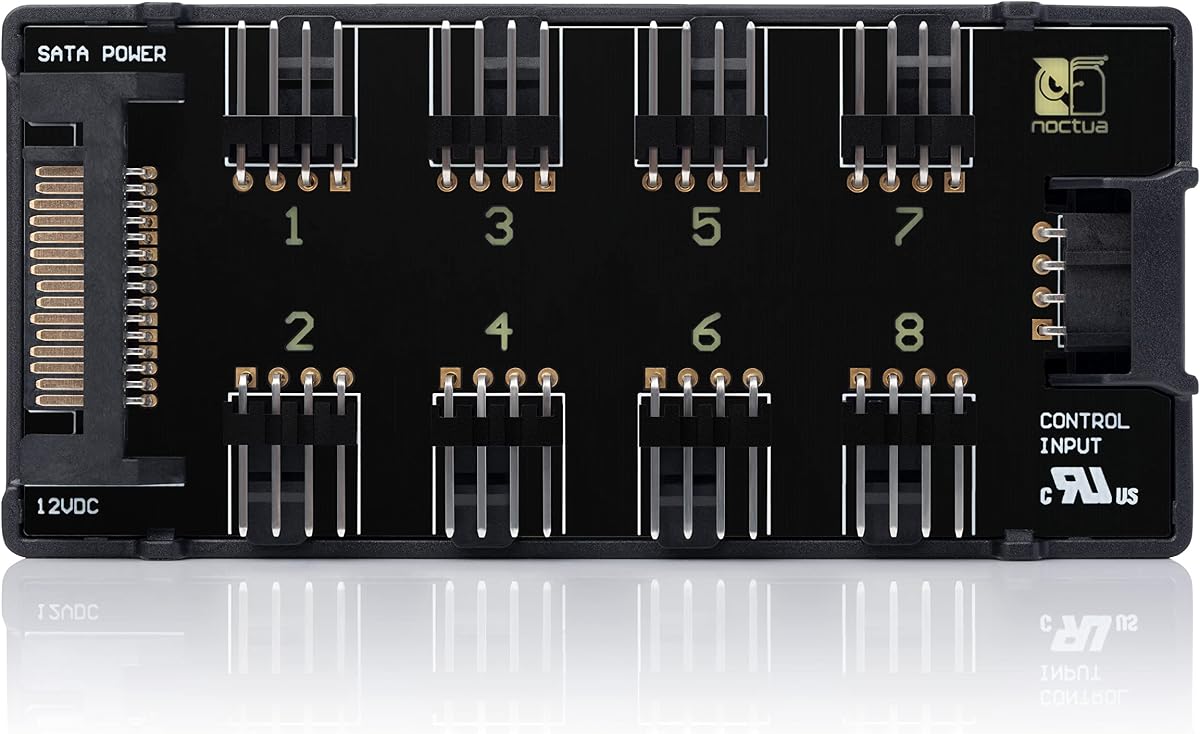
Noctua NA-FH1 8-Port PWM Fan Hub
4.6Editor score
Combined SATA and PWM inputs
Short-circuit and overcurrent protection
Six-year manufacturer warranty
Fan Control Hub for PC buying guide comparing ten models for port capacity, PWM control, ARGB support, power delivery, mounting, software, and cable management.
A fan control hub gives a PC build a practical way to connect more fans and lighting than the motherboard alone can support. The right hub can simplify wiring, preserve useful control features, and provide enough power for demanding cooling configurations. Important differences include port count, PWM behavior, ARGB compatibility, software support, and mounting options.
This guide compares ten fan control hubs using their stated specifications and product information. It covers basic power and signal splitters as well as hubs with remote lighting controls, temperature-based fan regulation, and operating-system-level fan management. The comparison also highlights where additional ports do not necessarily mean independent control or stronger monitoring.
Each numbered review explains the strongest use case, practical limitations, and compatibility details of its featured hub. The top selections represent three distinct priorities: broad feature support, refined cooling control, and efficient setup for larger fan arrays. Product listings and technical details can change, so buyers should verify current specifications and compatibility before ordering.
4.6Editor score

4.7Editor score

4.7Editor score
The table below compares all ten hubs by their core control type, capacity, power approach, and principal advantage. It makes clear which products are basic splitters, which combine fan and ARGB connections, and which add software or remote lighting controls.


The Thermalright ARGB Fan HUB Controller is a compact expansion device rated 4.5 out of 5 by customers. It is designed for builds that have more fans or addressable lighting devices than the motherboard can conveniently connect. Its combination of four-pin PWM fan sockets and five-volt, three-pin ARGB connectors makes it particularly useful for creating a tidier internal layout.
We may earn a commission when you buy through this link, at no additional cost to you.
SATA power provides the main electrical input, allowing the hub to support numerous connected devices without relying on a single motherboard header for everything. The hub can also carry a PWM signal and read the speed of a single fan connected through its designated red interface. ARGB lighting can synchronize with compatible five-volt devices, while the included mounting options allow it to sit against a steel panel or be fixed with adhesive.
The main limitation is that this is an interface and lighting expansion hub rather than a full standalone controller. It does not independently change fan speed or select lighting effects. Users who want independent curves for several fans, remote color selection, or broader software control should consider a more specialized option. The warning against connecting twelve-volt, four-pin RGB devices is especially important to follow.
This is a sensible choice for a builder who wants to connect eight ARGB fans or light bars while preserving motherboard-based PWM control. It offers useful capacity, straightforward power delivery, and flexible placement at a modest level of complexity. Verify every lighting connector before installation and connect only compatible five-volt ARGB equipment.
Routing several PWM and ARGB leads through one compact unit reduces the number of separate devices attached directly to the motherboard. The result is usually easier routing behind the tray and fewer loose splitter cables.
The hub expands ports and synchronizes compatible signals, but it does not act as a sophisticated fan-control center. Buyers needing separate speeds for each fan should look for individual PWM control and software support.
We may earn a commission when you buy through this link, at no additional cost to you.
The ARCTIC Fan Controller 10-Port earns a 4.7 rating and stands apart from simple hubs by offering individual PWM control for ten ports. It is designed for builders who want more than a synchronized motherboard signal, allowing compatible fan-control and monitoring software to manage connected fans with greater precision.
We may earn a commission when you buy through this link, at no additional cost to you.
Each port can supply up to two amps, with a total maximum of 4.5 amps. That output is more generous than many motherboard headers, although the aggregate limit still needs to be considered when several high-current fans run together. Native support for Windows and Linux with Kernel 7.2 or later broadens its usefulness for enthusiasts who use either platform for fan management.
The trade-off is that this hub is less attractive for a completely plug-and-play installation. Users must install or configure the relevant control software and verify compatibility with their preferred utilities. Unlike basic hubs that simply repeat a PWM command, individual port management allows a more sophisticated balance between noise, cooling, and power use. Magnetic and adhesive mounting provide flexibility during installation.
This is the strongest recommendation for users who actively tune fan curves or monitor several cooling devices. It combines ample ports, useful per-port control, and operating-system support in a compact package. For a simple synchronized setup, a basic splitter may be easier, but for genuine control and monitoring, this ARCTIC model offers substantially greater depth.
Independent PWM handling makes it possible to create different cooling profiles for intake, exhaust, CPU, and component fans. That flexibility is especially valuable in cases where airflow demand varies between zones.
The two-amp per-port allowance supports more demanding fan configurations than a typical motherboard header, while native software support expands monitoring and curve options.
We may earn a commission when you buy through this link, at no additional cost to you.
The Noctua NA-FH1 has a 4.6 customer rating and offers eight four-pin PWM outputs in a design centered on dependable power distribution. It can power and control multiple case fans while transmitting the motherboard's PWM signal, and its simultaneous support for SATA power and four-pin fan inputs provides installation flexibility.
We may earn a commission when you buy through this link, at no additional cost to you.
Safety fuses protect against overcurrent and short circuits, a meaningful advantage when several fans are connected. Power can come through SATA, while the four-pin connection can provide both the appropriate power and RPM and PWM signals. The hub supports up to 54 watts through SATA for twelve-volt fans and 24 watts through the four-pin interface, including compatible five-volt applications.
This model does not offer the individual port curves or extensive software integration of the ARCTIC Fan Controller, nor does it include ARGB lighting connectivity. Instead, its appeal lies in careful electrical design, strong magnetic mounting, applicable safety certifications, and a six-year manufacturer warranty. The result is a hub aimed at users who value long-term reliability and flexible power sources over RGB integration.
It is a strong premium recommendation for a serious air-cooled build that needs several synchronized PWM fans and robust protection. Install it on a suitable magnetic surface, use the included input cable, and check the aggregate current draw of connected devices. For cooling-focused builds without a need for addressable lighting, it provides a particularly mature feature set.
Integrated overcurrent and short-circuit safeguards reduce the risk of component damage or unreliable operation when a connected fan or cable develops a fault.
Using SATA power, four-pin power, or both allows the hub to fit different motherboard and case layouts while maintaining control signals where required.
We may earn a commission when you buy through this link, at no additional cost to you.
The ARCTIC Case Fan Hub 10-Port is rated 4.7 out of 5 and offers a straightforward way to expand a motherboard with too few fan headers. It provides ten four-pin PWM sockets, accepts SATA power and a four-pin motherboard input, and keeps the installed wiring concentrated in one compact device.
We may earn a commission when you buy through this link, at no additional cost to you.
The PWM command is passed synchronously to connected fans, while the speed reading from the first fan slot is returned to the system. Fans draw power from the power supply through SATA, reducing voltage loss and helping maintain smooth operation. Its listed output is up to one amp per port, with input current up to 4.5 amps, so buyers should check the requirements of high-current fans.
Its simplicity is both its main strength and its defining limitation. Every connected fan follows the same control signal, meaning the hub cannot assign different curves to intake and exhaust fans. There is also no ARGB lighting function or advanced monitoring interface. Nevertheless, that focused design makes it easier to install and less dependent on software.
This hub is best for a straightforward build that needs many synchronized fans and tidy cable routing. It is especially appropriate when the motherboard's existing headers are occupied and a simple expansion is preferable to a complex controller. Use the motherboard connection for the PWM signal and SATA for power, then confirm that the connected fan group stays within the stated current limits.
Ten outputs make it possible to connect a substantial group of case fans through one motherboard header, reducing the need for multiple loose Y-splitters.
Synchronous control is ideal when all fans should react together. It is less suitable for a build that requires different intake and exhaust curves or individual fan monitoring.
We may earn a commission when you buy through this link, at no additional cost to you.
The Thermalright ARGB and Fan HUB X12 IR White is built for high-capacity fan-and-lighting arrangements and carries a 4.4 customer rating. It can bring up to twelve groups of compatible PC fans into one central connection arrangement, combining four-pin PWM fan ports with three-pin, five-volt ARGB interfaces.
We may earn a commission when you buy through this link, at no additional cost to you.
Its stated capacity makes it appealing for cases with extensive intake and exhaust arrays, CPU coolers with multiple fans, or a coordinated lighting setup. PWM speed and ARGB effects can synchronize through the appropriate motherboard headers, while the hub itself remains an expansion device. SATA power feeds the connected equipment, and the included 500-millimeter lead provides practical placement flexibility.
Users should note that the SATA power cable must be purchased separately. The hub also recognizes the speed of only one fan through its red interface because of motherboard PWM-reading limitations. It does not provide a way to adjust fan speed or lighting effects on its own, and twelve-volt, four-pin RGB equipment must not be connected to the ARGB ports.
This is a useful high-capacity option for a visually coordinated build where the motherboard offers too few suitable connections. It works best for users who already understand the distinction between PWM fan headers and five-volt ARGB headers. Confirm the required cable and connection types, then use the adhesive mounting system to place the hub where its short leads can reach the intended devices.
Twelve device groups provide room for large cooling and lighting arrangements, reducing the number of separate splitters attached directly to the motherboard.
Matching PWM and ARGB connections help a builder create a unified appearance while maintaining a more organized cable path behind the case tray.
We may earn a commission when you buy through this link, at no additional cost to you.
The upHere P10PARGB Magnetic Fan Hub is a 4.6-rated option aimed at builders who want convenient lighting control without opening a monitoring application. It can manage up to nine PWM fans and five-volt addressable ARGB devices through one SATA-powered hub, with a front-facing RGB panel that displays the selected lighting state.
We may earn a commission when you buy through this link, at no additional cost to you.
The supplied remote makes it easy to change colors and dynamic lighting effects. A synchronization cable allows the hub's lighting behavior to coordinate with compatible ARGB equipment, while magnetic mounting lets the controller sit securely against a ferrous case surface. The package includes the remote, SATA cable, PWM and ARGB leads, and a synchronization cable, reducing the need to source a complete accessory set separately.
Despite its name and remote functionality, the remote is principally intended for lighting rather than a full suite of independent cooling controls. Users who require separate fan curves and detailed monitoring should not treat it as a software-controlled fan center. The additional leads and remote-related components also require enough space behind the motherboard tray to keep the wiring manageable.
This is a compelling pick for a custom RGB build where easy, hands-on lighting changes are a priority. It combines generous fan capacity, ARGB support, and an attractive remote workflow in a single package. Confirm the dimensions of the case's usable interior and plan the connection path before installation to prevent the included accessories from making the final layout less tidy.
Remote color and effect selection is useful for quickly matching a hub to different games, viewing habits, or room lighting without navigating operating-system controls.
The bundled SATA, fan, ARGB, and synchronization cables make the package more convenient for a new build, provided there is sufficient room to route them.
We may earn a commission when you buy through this link, at no additional cost to you.
The Thermalright Integrated Fan Hub is rated 4.6 out of 5 and focuses on a clear task: connecting as many as ten four-pin fans through a single central hub. It uses a SATA power input for stable delivery and can carry a motherboard PWM signal to the connected group, making it a practical option for airflow-heavy cases with limited headers.
We may earn a commission when you buy through this link, at no additional cost to you.
Its small body and long enough cable arrangement can simplify the otherwise messy task of routing multiple fan leads. A strong double-sided sticker secures the hub to the chassis, while the top surface carries a restrained Thermalright design that remains functional in a visible position. The design is aimed more at organized cooling than decorative RGB integration.
The product does not include a SATA cable, so that item needs to be accounted for during installation. Only one connected fan's speed is read because of the limitations of the motherboard's PWM-reading chip. It is a hub and synchronizer rather than a full controller, so lighting effects and individual fan curves are outside its scope.
Choose this model when a build needs many conventional PWM case fans but does not require addressable lighting or per-fan software profiles. Its ten-port capacity and direct SATA power make it efficient for radiator fans, intake fans, and exhaust fans. The main preparation is to ensure a SATA power lead is available and to arrange the installation around the shared control signal.
A ten-port hub resolves motherboard header shortages in cases that use several radiator, intake, and exhaust fans.
Drawing fan power through SATA can reduce the load placed on a motherboard header and helps support consistent operation across the connected group.
We may earn a commission when you buy through this link, at no additional cost to you.
The Thermalright FAN and ARGB HUB X8 is a 4.5-rated hub for builds that need a moderate number of both PWM fans and ARGB devices. It supports eight ARGB fan groups and eight PWM fan groups, placing four lighting connectors and four fan connectors on each side so short cables can remain orderly.
We may earn a commission when you buy through this link, at no additional cost to you.
The hub is powered directly from SATA and can maintain stable output under high loads. Once connected to appropriate motherboard headers, compatible three-pin, five-volt ARGB equipment can synchronize its lighting effects, while PWM fans can share a synchronized speed command. The included adhesive system allows placement in a visible or hidden location according to the case's internal layout.
This is not an independently programmable controller. It expands the number of usable connections but does not let the user choose a separate fan curve for every port or manually select individual lighting effects. The stated dimensions of 140 by 64 by 16 millimeters offer a relatively slim profile, and a black finish should blend into most case interiors.
This model fits well for a balanced build of eight fans with matching addressable lighting, especially when the motherboard offers only one suitable ARGB header. It provides a useful middle ground between a basic fan splitter and a larger twelve-group hub. Buyers need a SATA power cable and should ensure every attached light uses the five-volt, three-pin ARGB standard.
Equal support for eight ARGB and eight PWM groups makes the hub convenient for builds where the cooling and lighting counts are similar.
Slim construction and connectors on both sides help keep the wiring bundle close to the chassis instead of creating long, crossing runs behind the tray.
We may earn a commission when you buy through this link, at no additional cost to you.
The J-10 Pro ARGB Fan Hub has a 4.4 rating and combines ten-device-group capacity with an RF remote, a chassis key, magnetic mounting, and support for compatible ARGB and PWM equipment. It is aimed at builders who want direct control over lighting without relying entirely on motherboard software.
We may earn a commission when you buy through this link, at no additional cost to you.
The hub accepts SATA power and can support up to ten fans, while its five-volt, three-pin ARGB connections handle compatible fans and light bars. An RF remote and chassis key provide convenient control over the lighting state. A designated red interface can pass PWM regulation, although only the speed of one fan connected there is recognized because of the limitations of the motherboard controller.
Its remote and key are useful for quick changes, but the product's wording makes clear that the controller is primarily intended for lighting switching. The twelve-volt, four-pin motherboard connection is still required for the fan PWM function. Users should not connect twelve-volt, four-pin RGB devices to the three-pin ARGB sockets, as the two standards are not interchangeable.
The J-10 Pro is best for a lighting-forward build that also needs a sizable number of fan connections and prefers physical controls. Its compact magnetic body can be placed near a visible panel or in a hidden cable-management area. Set up the motherboard PWM link first, confirm the fan current requirements, and use only compatible five-volt ARGB equipment.
Both an RF remote and a chassis key make it easy to change lighting without navigating a software application, which is particularly convenient for everyday adjustments.
The fan PWM link, SATA power input, and five-volt ARGB lighting ports serve different purposes. Connecting each to the correct source is essential for reliable operation.
We may earn a commission when you buy through this link, at no additional cost to you.
The Thermalright Fan and ARGB HUB X8 is rated 4.6 out of 5 and provides a focused way to combine up to eight groups of compatible PWM fans and ARGB devices. Its four-pin fan connectors and three-pin, five-volt ARGB connectors support both cooling and lighting while reducing the number of leads attached directly to the motherboard.
We may earn a commission when you buy through this link, at no additional cost to you.
SATA power provides direct, stable output, and the appropriate motherboard connections allow synchronized fan speeds and lighting effects. The red PWM interface can read the speed of one fan, which is useful for basic monitoring within the limitations of typical motherboard fan chips. Strong double-sided adhesive gives the installer flexibility in placing the hub inside the chassis.
The hub does not adjust fan speed or lighting color itself, so users rely on the connected motherboard or lighting controller for those functions. A SATA cable is not included, adding one more preparation item before installation. Twelve-volt, four-pin RGB devices must never be attached to the five-volt ARGB interface, and the 3-pin ARGB plug also differs from some proprietary four-pin lighting layouts.
This is a practical selection for an eight-fan build with matching addressable lighting and limited motherboard headers. It offers more integrated cable management than separate PWM and ARGB splitters without introducing the complexity of a software-controlled device. Prepare the correct SATA and motherboard leads, check every lighting connector, and place the hub where the adhesive surface is clean and secure.
Combining PWM and ARGB connections in one body makes cable organization easier while keeping fan speed and lighting behavior synchronized.
Because the hub is fixed with adhesive, checking the SATA lead, motherboard connections, and device reach before installation helps prevent awkward repositioning later.
We may earn a commission when you buy through this link, at no additional cost to you.
The right fan control hub depends on how many devices you need to connect, whether those devices require synchronized or independent control, and how much power they draw. Compatibility with your motherboard, case, lighting standard, and monitoring software matters just as much as the headline port count.
Start by counting every four-pin PWM fan and, if applicable, every addressable lighting device that needs a connection. A conventional fan-only hub may be sufficient for eight to ten case fans, while a combined ARGB and PWM hub requires enough sockets of both types. Do not count light strips against fan ports unless the manufacturer explicitly describes the connector as shared.
Choose capacity for the completed build, not merely the number of fans visible in the case. Radiators, CPU coolers, expansion-card fans, and future additions can consume several connections at once. A modest spare-port margin can also make later changes easier.
A PWM hub may either repeat a shared motherboard command or provide independent control for each port. Shared synchronization is simple and effective when all fans should run at the same level, but independent control is more valuable when intake, exhaust, radiator, and CPU fans need different curves.
Check whether monitoring is also expanded. Some hubs read the speed of only one fan through a special red input, while more advanced controllers expose more complete telemetry to software. Buyers should not assume that a multi-port hub automatically provides multi-fan RPM monitoring.
The relevant addressable standard is five volts with three pins, often called 5V ARGB. It is not interchangeable with twelve-volt, four-pin RGB, even when both formats are sometimes described generically as RGB. Use only connectors explicitly compatible with the hub and pay attention to the marked five-volt orientation.
A 3-pin ARGB connector may not fit a proprietary 4-pin ARGB header without a suitable adapter. A combined hub is useful only when its lighting ports match the fans and strips already in the build. If lighting control is secondary, a dedicated PWM hub may offer a simpler installation.
Review both the per-port and total current limits. A hub with a generous per-port allowance may still be constrained by its aggregate capacity, particularly when several high-current fans operate at the same time. Motherboard header limits and the power supply's available SATA connectors also influence the practical installation.
SATA-powered models separate fan power from the motherboard's PWM header, which is useful for reducing header load. Fans still need suitable power connectors and adequate cable routing. Avoid adding unofficial splitters that exceed the hub's rated current or create a chain of undocumented power connections.
Standalone controllers with native operating-system support can integrate with fan-control utilities and provide more granular curves, alerts, and monitoring. Confirm that the required drivers or control application work with the user's operating system before buying. Linux compatibility may also depend on a minimum kernel version.
Basic hubs are often preferable for systems that already have well-configured motherboard fan control. They require less software and preserve the control interface users already know. Software capability should therefore match the complexity of the build rather than being treated as an automatic upgrade.
Magnetic mounting is convenient on steel case panels but may not hold well on aluminum or other non-ferrous surfaces. Adhesive mounting works on more materials but requires careful surface preparation and leaves little room for repositioning after installation. Some cases provide dedicated mounting points for hubs and controllers.
Hub dimensions and connector placement are also important. A slim profile can fit behind the motherboard tray, while side-mounted connectors make short fan leads easier to arrange. Before purchasing, compare the hub's footprint and lead length with the usable space and the distance from the power supply's SATA connectors.
Short-circuit and overcurrent protection add a useful safety layer in multi-fan installations. A protected hub can reduce the consequences of an accidental wiring fault, a damaged lead, or a fan that draws beyond expectations. Applicable safety certifications can also provide additional confidence in the design.
Protection does not remove the need to observe current limits. Continue to use correct power sources, avoid damaged cables, and ensure that any connected fan is compatible with the hub's intended voltage and connector type.
Remote-controlled hubs focus on immediate lighting changes, while software-controlled hubs focus on cooling curves and monitoring. Some products combine both, but each has a different center of gravity. Decide whether the primary goal is tidier wiring, more addressable lighting, synchronized fan behavior, or advanced thermal management.
The most capable option is not automatically the easiest to use. A simple shared-signal hub may satisfy a clean build better than an elaborate controller, while a system with multiple cooling zones and changing workloads benefits greatly from per-fan adjustment.
Begin by planning the electrical path and the signal path separately. Identify the correct SATA power connection for the hub, select the motherboard header that will carry the PWM command, and match the ARGB synchronization port to a compatible five-volt, three-pin header. Read the hub's labeling and manual before connecting anything, particularly when twelve-volt, four-pin RGB equipment is present.
Install the hub before attaching all of the short device leads. Magnetic models can be positioned against a suitable steel surface, while adhesive models should be attached to a clean, dry, flat area. Route the main leads first, then connect the fans and lighting one at a time. Keep airflow components clear, avoid sharply bending power wires, and ensure that connectors are fully seated without forcing them.
After installation, power on the system and confirm that every fan spins, that the intended speed command reaches the connected group, and that the lighting matches the selected synchronization source. For software-controlled models, install the required driver or utility, create suitable fan curves, and monitor the readings. If a fan does not start, test it in a known-good header and check the complete power path before reconnecting anything.
A basic fan hub expands the number of available fan connections and often passes one PWM signal to every connected fan. A full fan controller may support individual fan curves, temperature-based regulation, monitoring, and software integration. The right choice depends on whether synchronized fans are sufficient or each cooling zone needs different behavior.
Only if the hub specifically includes a five-volt, three-pin ARGB interface. Some hubs support ARGB synchronization, some add remote lighting control, and others have no lighting functionality at all. They also cannot safely accept twelve-volt, four-pin RGB devices, so connector standards must be checked before purchase and installation.
No. Many hubs expose the RPM of only one fan through a designated red input because the motherboard fan controller cannot read multiple tachometer signals from a shared header. Software-controlled controllers with individual channels generally provide more detailed monitoring, but their exact capabilities should be verified before purchase.
It depends on the model. A hub with a SATA power input should receive fan power through that connection, while the motherboard header normally supplies the PWM signal or suitable control information. Some basic splitters draw all power from the motherboard header, but that can limit the number or type of fans that can be connected safely.
Only when the hub explicitly supports suitable 5V power and the fan has the correct power adapter or connection method. The Noctua NA-FH1 lists 5V application support and 24 watts through its four-pin interface. For 12V PC fans, use the hub's stated SATA or other power arrangement as directed by the manufacturer.
Yes, provided the hub is positioned near the devices it serves and its leads are routed intentionally. A central hub replaces multiple motherboard splitter cables and keeps short device leads together. Magnetic or adhesive mounting can further reduce clutter, though adequate space behind the motherboard tray remains important.
Confirm the voltage, pin count, connector shape, and marked orientation. A 5V three-pin ARGB connection should not receive 12V four-pin RGB equipment, and proprietary four-pin ARGB headers may require an appropriate adapter. Incorrect connection can damage the hub, lighting device, or connected controller.
Choose synchronized control when all fans are similar and should react to one motherboard curve. Choose individual control when intake, exhaust, CPU, and component fans need separate curves or readings. Individual control usually requires compatible software, while synchronized control is generally simpler to configure and maintain.
The ARCTIC Fan Controller 10-Port is the strongest all-around choice for users who want individual PWM control, useful power capacity, and native Windows and Linux support. The Noctua NA-FH1 stands out for electrical protection, flexible inputs, and long-term manufacturer backing, while the ARCTIC Case Fan Hub offers the simplest path to adding a synchronized group of ten fans.
For builders focused on lighting, the upHere P10PARGB provides remote color control and a useful accessory package, while the Thermalright and J-10 Pro options expand both fan and ARGB capacity. Prioritize connector compatibility, current limits, control behavior, and available mounting space before considering a larger hub. A model that matches the build's actual need is easier to install and more reliable than one with unnecessary features.
Finally, review the current product listing, included accessories, compatibility notes, and safety instructions before ordering. Hub designs and software support can evolve, and some models require a separately purchased SATA cable. Confirming those details at the time of purchase helps prevent missing parts or connecting the wrong fan and lighting standards.